Introducing “vibe design” with Stitch
In the rapidly evolving landscape of design technology, Google Labs has unveiled a revolutionary approach to UI design called “vibe design” with its innovative tool, Stitch. This AI-native software design canvas transforms the way designers and teams create, iterate, and collaborate on high-fidelity user interfaces using natural language. This article explores the features and benefits of vibe design and how it enhances the design process.
The Evolution of Stitch
Over the past year, artificial intelligence has significantly altered the methodologies behind software development. Google Labs launched Stitch to help users bring their ideas to life, starting from the design phase. With the latest updates, Stitch has evolved into an expansive AI-native software design canvas that allows users to create and refine their designs seamlessly.
What is Vibe Design?
Vibe design is a new approach that encourages designers to focus on the emotional and experiential aspects of their projects. Instead of beginning with a rigid wireframe, users can articulate their business objectives, desired user experiences, and inspirations in natural language. This method fosters creativity and allows for a more fluid design process.
A New AI-Native Design Canvas
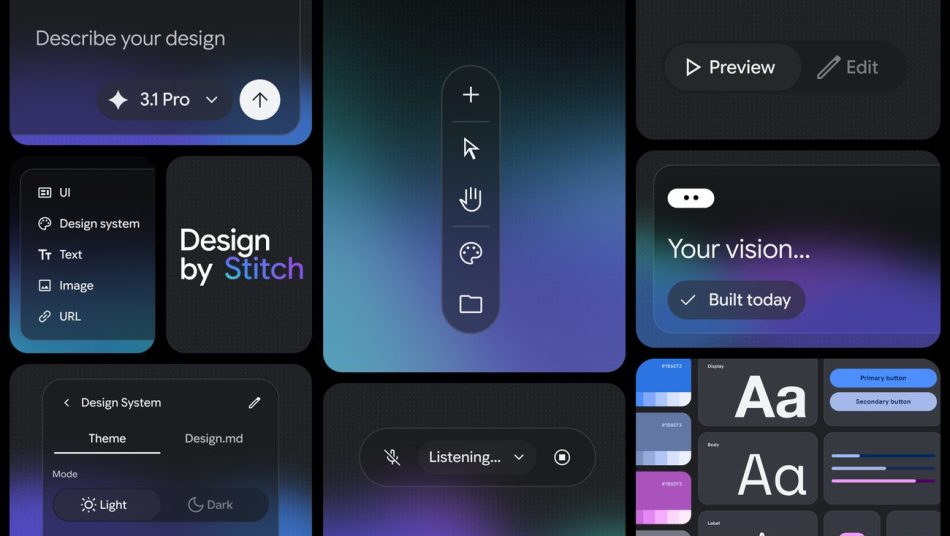
The redesigned Stitch UI features an infinite canvas that provides ample space for ideas to flourish. This canvas is specifically designed to support the divergent and convergent phases of the design process, allowing users to explore various concepts before settling on a final design. Key features of the new canvas include:
- Flexible Input: Users can bring in images, text, or code directly onto the canvas, providing rich context for their ideas.
- Design Agent: A new design agent can reason through the project’s evolution, helping users maintain focus and direction.
- Agent Manager: This feature enables users to manage multiple ideas simultaneously, ensuring organization and clarity throughout the design process.
Design Systems with DESIGN.md
Stitch has expanded its design system toolkit to allow for deeper contextual creation. Users can easily extract design systems from any URL or utilize the new DESIGN.md file format. This agent-friendly markdown file enables the import and export of design rules between different design and coding tools. Benefits include:
- Reusability: Users can apply existing designs to new projects without starting from scratch.
- Consistency: Maintaining a cohesive design language across projects becomes effortless.
Rapid Iteration and Real-Time Testing
The design process is inherently iterative, and Stitch facilitates this by allowing users to transform static designs into interactive prototypes instantly. Key functionalities include:
- Instant Prototyping: Users can quickly stitch screens together and preview their interactive app flows with a simple click.
- Automated User Journey Mapping: Stitch can generate logical next screens based on user interactions, streamlining the mapping of user journeys.
- Feedback Loop: The rapid feedback mechanism allows for quick refinements, ensuring that the best ideas are validated and polished efficiently.
Collaborating with AI
Stitch enhances collaboration by integrating AI as a creative partner throughout the design workflow. Some of the collaborative features include:
- Voice Capabilities: Users can interact with the canvas using voice commands, allowing for real-time design critiques and updates.
- Dynamic Dialogue: The AI acts as a sounding board, helping designers explore their ideas through conversation and critique.
From Design to Code
Stitch also bridges the gap between design and development. With the recently released Stitch MCP server and SDK, users can leverage Stitch’s capabilities through various skills and tools. Key benefits include:
- Seamless Integration: Designs can be exported to developer tools like AI Studio and Antigravity, ensuring a synchronized workflow between designers and developers.
- Enhanced Collaboration: The partnership between designers, AI, and developers becomes more cohesive, facilitating a smoother transition from design to implementation.
Getting Started with Stitch
Whether you are a professional designer or a novice, Stitch offers an accessible platform for creating high-quality UI designs. By harnessing the power of AI and natural language, users can bring their visions to life with unprecedented ease and efficiency. Here are some tips to get started:
- Define Your Objectives: Clearly articulate the goals of your design project to guide your creative process.
- Utilize the Infinite Canvas: Take advantage of the expansive canvas to explore multiple ideas and concepts.
- Engage with the AI: Use voice commands to interact with the design agent for real-time feedback and suggestions.
- Iterate and Refine: Leverage the rapid prototyping features to test and refine your designs continuously.
Conclusion
The introduction of vibe design with Stitch marks a significant advancement in the field of UI design. By combining the power of AI with a user-friendly interface, Google Labs is empowering designers to create, iterate, and collaborate like never before. As the design landscape continues to evolve, tools like Stitch will play a crucial role in shaping the future of creative workflows.
Note: The information presented in this article reflects the latest updates and features of Stitch as of March 2026.