
TradingView AI Chart Copilot: public beta is available now
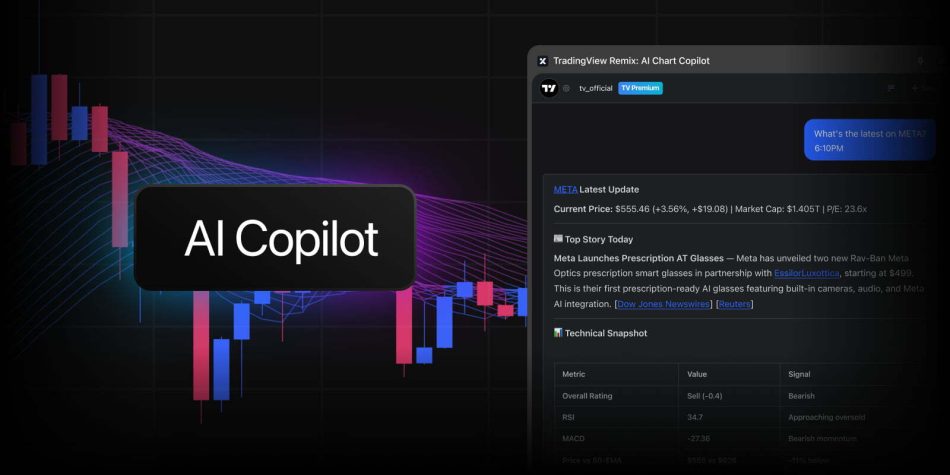
As of April 2, TradingView has introduced an innovative tool known as the TradingView AI Chart Copilot. This AI-powered assistant is designed to enhance the trading experience by providing real-time insights and analysis directly alongside your TradingView charts. The public beta is now available to all TradingView users, allowing traders to experience the future of market analysis.
What is the TradingView AI Chart Copilot?
The TradingView AI Chart Copilot is a browser extension that integrates seamlessly with TradingView’s charting platform. It operates within the browser’s side panel, offering users the ability to ask questions and receive immediate answers regarding market movements and trading setups. This tool is compatible with Chrome and other Chromium-based browsers, including Edge, Opera, Brave, and Vivaldi.
Getting Started with the Chart Copilot
Starting with the TradingView AI Chart Copilot is quick and easy. Here’s how you can get started:
- Install the TradingView Chart Copilot extension.
- Open any TradingView chart.
- Click the extension icon to launch the assistant.
- Sign in to your TradingView account.
- Begin your market analysis using the AI assistant.
Key Features of the AI Chart Copilot
The AI Chart Copilot offers a variety of features designed to streamline the trading process and enhance decision-making. Here are some of the top use cases:
1. Technical Analysis
Users can ask the Copilot for a comprehensive technical breakdown of any asset. This includes:
- Moving averages
- Relative Strength Index (RSI)
- Moving Average Convergence Divergence (MACD)
- Key support and resistance levels
- Overall technical rating
All of this information is synthesized into a clear and concise outlook, allowing traders to make informed decisions quickly.
2. Managing Alerts
The Copilot simplifies the process of managing alerts. Users can instruct the assistant to set alerts at various levels identified during analysis. Additionally, users can:
- List existing alerts
- Pause or restart alerts
- Delete alerts through simple conversation
This feature eliminates the need to navigate through multiple alert dialogs, saving time and effort.
3. Understanding Market Movements
When traders are curious about why a particular asset is moving, the Copilot can pull together the latest news, earnings data, and fundamental metrics. This allows users to quickly grasp the catalysts behind price movements. Users can click on any headline to read the full story without having to switch tabs.
4. Finding Trading Opportunities
The AI Chart Copilot can assist users in identifying potential trading opportunities. Traders can ask for:
- Stocks making 52-week highs
- Filters based on sector, volume, or technical signals
- Scans of active watchlists for setups
By clicking on any result, users can pull up the relevant chart and continue their analysis seamlessly.
Why a Public Beta?
The launch of the TradingView AI Chart Copilot as a public beta is a strategic decision aimed at involving the community in its development. TradingView believes that AI-assisted charting will significantly change how traders interact with the markets. By gathering user feedback during the beta phase, TradingView aims to refine and improve the experience.
Users are encouraged to provide feedback on what works, what doesn’t, and what features they would like to see in the future. This feedback can be submitted through the chat interface, where users can upvote or downvote responses, or through discussions on the TradingView community forum.
Conclusion
The TradingView AI Chart Copilot represents a significant advancement in trading technology, offering users powerful tools to enhance their market analysis and decision-making processes. As the public beta continues, TradingView is eager to hear from users and make iterative improvements based on their experiences.
To gain an edge in your trading, consider installing the TradingView Chart Copilot and explore its capabilities. The future of trading is here, and it’s powered by AI.
Note: The availability of features may vary during the beta phase, and TradingView may implement usage limits to ensure sustainability.